
AI Worker SH5 Isaac Sim VR Teleoperation
Full Demo
This video demonstrates AI Worker SH5 VR and keyboard teleoperation in Isaac Sim, including pick-and-place and mobile manipulation in virtual environments.
1. Overview
This project implements a DDS-based bridge that connects external ROS 2 command topics to the AI Worker SH5 model running in Isaac Sim. It allows the SH5 control stack to be tested without immediate access to physical hardware and can be used to prepare virtual task environments for imitation learning toward Physical AI applications.
The main script, sh5_dds_bringup.py, loads the SH5 model with FFW_SH5.py, receives JointTrajectory and /cmd_vel commands through robotis_dds_python, and applies them to the simulated SH5 articulation.
The core idea is simple:
- ROS 2 controllers publish SH5 arm, hand, lift, and mobile base commands.
sh5_dds_bringup.pyreceives the commands through the DDS SDK.- The SH5 model moves in Isaac Sim and publishes state topics for pose checking.
Key Packages and File Structure
The SH5 DDS bringup path mainly uses:
sh5_dds_bringup.py: Main Isaac Sim bridge for SH5 model loading, DDS communication, command application, and state publishing.FFW_SH5.py: SH5 robot model configuration used by Isaac Lab/Isaac Sim to define the USD path, articulation properties, initial joint state, actuators, and joint limits.swerve_drive.py: Three-module swerve drive controller that converts/cmd_velinto steering positions and wheel velocities.environment.py: Environment helper for loading the default NVIDIA Simple Warehouse USD scene.robotis_dds_python: DDS SDK used to communicate with ROS 2-compatible topics through CycloneDDS.
2. System Architecture
The SH5 DDS bringup system is organized around the following main components:
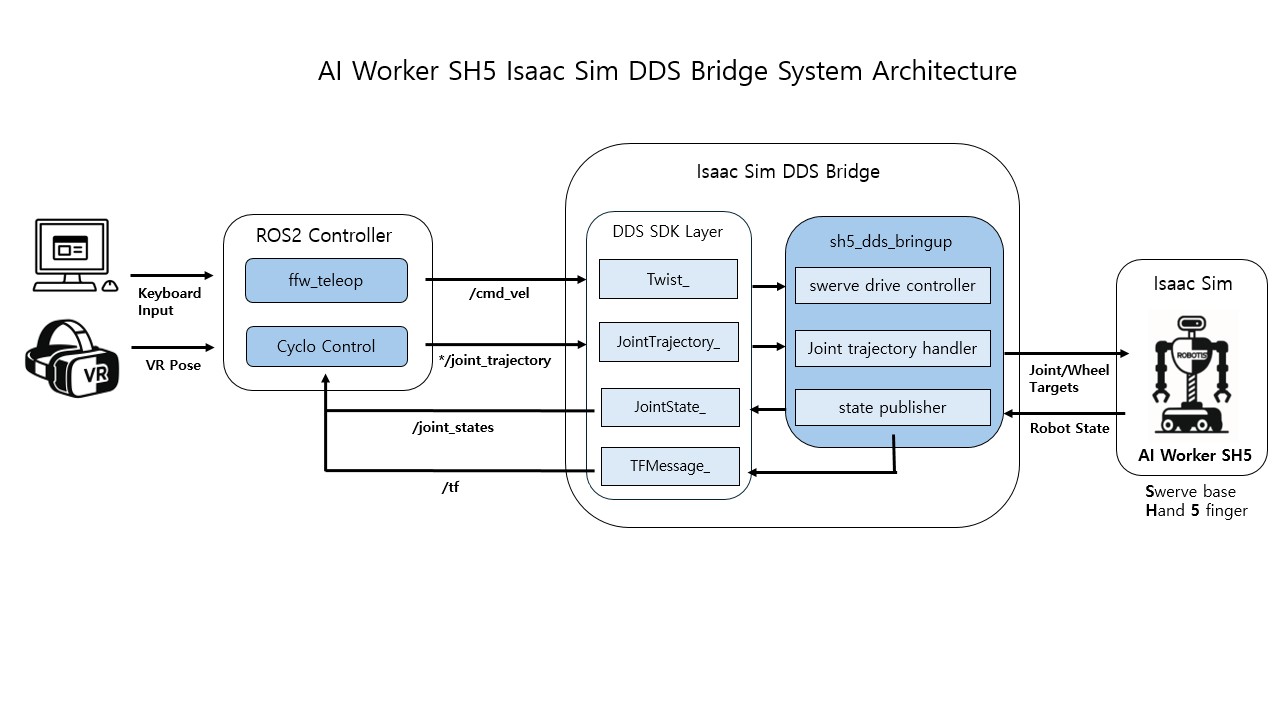
- VR Device: Provides operator pose input to the external ROS 2 teleoperation stack.
- ROS 2 Controllers:
cyclo_motion_controllerretargets the VR pose and publishes SH5JointTrajectorycommands for the arms, hands, and lift, whileffw_teleop/mobile_teleoppublishes/cmd_velfor the swerve mobile base. - DDS SDK Layer: Uses
robotis_dds_pythonand CycloneDDS to exchange ROS 2-compatible messages with the Isaac Sim Python process. - SH5 DDS Bringup: Spawns the SH5 model and optional Simple Warehouse environment, receives command topics, maps joint names to Isaac Sim articulation joints, applies swerve drive targets, and publishes simulated
/joint_statesand/tf. - Isaac Sim Visualization: Shows the commanded SH5 motion and provides the main viewport for checking VR teleoperation behavior in simulation.
3. Start Guide
Step 1: Launch the SH5 DDS Bringup in Isaac Sim
Enter the ROBOTIS Lab Docker container:
cd ~
git clone https://github.com/ROBOTIS-GIT/robotis_lab.git

cd ~/robotis_lab/docker
./container.sh start
./container.sh enter
Launch the SH5 model and DDS bridge:
python scripts/sim2real/bringup/sh5_dds_bringup.py \
  --domain_id 30 \
  --enable_gravity \
  --enable_camera_views
To include the default NVIDIA Simple Warehouse environment:
python scripts/sim2real/bringup/sh5_dds_bringup.py \
  --domain_id 30 \
  --enable_gravity \
  --enable_camera_views \
  --enable_environment
WARNING
The DDS domain ID must match the external ROS 2 containers that publish the command topics. For example, if Isaac Sim uses --domain_id <number>, the VR interface and ROS 2 controller containers must use the same ROS domain ID.
Step 2: Connect the VR Interface
INFO
For the complete VR device setup, Vuer page connection, and operation procedure, refer to the AI Worker VR Teleoperation Guide.
Enter the robotis_applications Docker container:
cd ~
git clone https://github.com/ROBOTIS-GIT/robotis_applications.git

cd ~/robotis_applications/docker
./container.sh start
./container.sh enter
Launch the VR interface:
ros2 launch robotis_vuer vr.launch.py model:=sh5Or use the shortcut:
vr model:=sh5TIP
If lift motion should be disabled for a more stable manipulation test, set the VR lift_publisher option to false and reduce the lift_joint velocity limit to 0.0001 in the FFW_SH5.py.
Step 3: Launch the ROS 2 Motion Controller
Enter the ai_worker Docker container:
cd ~
git clone https://github.com/ROBOTIS-GIT/ai_worker.git

cd ~/ai_worker/docker
./container.sh start
./container.sh enter
Launch cyclo_motion_controller:
ros2 launch cyclo_motion_controller_ros ai_worker_controller.launch.py controller_type:=vr hand:=trueOr use the shortcut command:
motion_controller controller_type:=vr hand:=trueStep 4: Run Mobile Base Teleoperation
Run mobile_teleop to publish /cmd_vel:
ros2 run ffw_teleop mobile_teleop| Key | Command |
|---|---|
W / S | Move forward / backward |
A / D | Turn left / right |
Space | Stop |
Ctrl+C | Quit |
TIP
You can modify mobile_teleop to add custom key mappings and support freer base movement.
4. SH5 Model Configuration
The SH5 Isaac Sim model is defined in FFW_SH5.py. This configuration does more than load the USD file; it also adjusts physics properties so the hand and swerve base can move smoothly in simulation.
Fingertip Material
The real SH5 hand uses rubber-like fingertip surfaces for grip. To reflect this in simulation, the SH5 fingertips use a custom high-friction physics material that is bound to the finger collision prims.
_SH5_FINGER_TIP_MATERIAL = RigidBodyMaterialCfg(
    static_friction=2.0,
    dynamic_friction=1.8,
    restitution=0.0,
)
Hand Collision Filtering
The hand base collision is filtered against selected MCP and PIP finger links:
_SH5_BASE_COLLISION_LINKS = (5, 6, 9, 10, 13, 14, 17, 18)These collision pairs are disabled because the finger links can otherwise collide with the hand base during lateral opening and closing motions. Filtering them allows the fingers to move side-to-side more smoothly and prevents unnecessary self-collision resistance in the simulated hand.
Swerve Base Collision Filtering
The mobile base also filters collision pairs between base_link and the wheel drive links:
_SH5_WHEEL_DRIVE_LINKS = ("left_wheel_drive", "right_wheel_drive", "rear_wheel_drive")This prevents the base collider from interfering with the wheel drive colliders. With these pairs filtered, the steer joints can rotate smoothly and respond more directly to swerve drive commands.
5. Command Flow
This architecture connects the external ROS 2 command interface to the Isaac Sim simulation runtime. The ROS 2 controllers generate robot commands outside Isaac Sim, while sh5_dds_bringup.py receives those topics through the DDS SDK and applies them to the SH5 model in the virtual environment.
The important point is that Isaac Sim becomes a command target for the same ROS 2 control flow used outside the simulator. This allows the SH5 model to move in virtual scenes, test base motion and manipulation behavior, and publish /joint_states and /tf as state topics for initial pose checking and transform inspection.
The overall command flow is:
VR Device
  ↓
VR Pose Input
  ↓
Cyclo Motion Controller
  ↓
Retargeting
  ↓
ROS 2 JointTrajectory Command Topics
  ├── /leader/joint_trajectory_command_broadcaster_right/joint_trajectory
  ├── /leader/joint_trajectory_command_broadcaster_right_hand/joint_trajectory
  ├── /leader/joint_trajectory_command_broadcaster_left/joint_trajectory
  ├── /leader/joint_trajectory_command_broadcaster_left_hand/joint_trajectory
  └── /leader/joystick_controller_right/joint_trajectory
        ↓
robotis_dds_python / CycloneDDS
        ↓
sh5_dds_bringup.py
        ↓
Isaac Sim SH5 Articulation
        ↓
Isaac Sim Viewport
The mobile base command flow is:
ffw_teleop / mobile_teleop
  ↓
/cmd_vel
  ↓
robotis_dds_python / CycloneDDS
  ↓
sh5_dds_bringup.py
  ↓
Swerve Drive Controller
  ↓
Isaac Sim SH5 Mobile Base
  ↓
Isaac Sim Viewport
The state topic flow is:
Isaac Sim SH5 Articulation
  ↓
sh5_dds_bringup.py
  ↓
robotis_dds_python / CycloneDDS
  ↓
ROS 2 State Topics
  ├── /joint_states
  └── /tf
        ↓
Initial pose check / state reference
6. DDS Topic and Message Mapping
The Isaac Sim bridge uses robotis_dds_python to communicate with ROS 2-compatible topics through CycloneDDS. Each ROS 2 message type is represented by an IDL-generated Python class with an underscore suffix, such as JointTrajectory_, Twist_, JointState_, and TFMessage_.
| Topic | Direction | DDS SDK Message Class | ROS 2 Message Type | Description |
|---|---|---|---|---|
/leader/joint_trajectory_command_broadcaster_right/joint_trajectory | Subscribe | JointTrajectory_ | trajectory_msgs/msg/JointTrajectory | Right arm command |
/leader/joint_trajectory_command_broadcaster_right_hand/joint_trajectory | Subscribe | JointTrajectory_ | trajectory_msgs/msg/JointTrajectory | Right hand command |
/leader/joint_trajectory_command_broadcaster_left/joint_trajectory | Subscribe | JointTrajectory_ | trajectory_msgs/msg/JointTrajectory | Left arm command |
/leader/joint_trajectory_command_broadcaster_left_hand/joint_trajectory | Subscribe | JointTrajectory_ | trajectory_msgs/msg/JointTrajectory | Left hand command |
/leader/joystick_controller_right/joint_trajectory | Subscribe | JointTrajectory_ | trajectory_msgs/msg/JointTrajectory | Lift command |
/cmd_vel | Subscribe | Twist_ | geometry_msgs/msg/Twist | Mobile base command from ffw_teleop/mobile_teleop |
/joint_states | Publish | JointState_ | sensor_msgs/msg/JointState | Simulated joint state for pose checking |
/tf | Publish | TFMessage_ | tf2_msgs/msg/TFMessage | Simulated transform state for initial pose checking |
For the JointTrajectory_ command topics, the bridge reads the latest trajectory point, extracts joint_names and positions, and maps them to the matching SH5 articulation joints in Isaac Sim.
For /cmd_vel, the bridge receives a Twist_ message and uses linear.x, linear.y, and angular.z as the mobile base velocity command. These values are passed to the swerve drive controller, which generates steering joint targets and wheel velocity targets.
For state checking, the bridge publishes /joint_states using JointState_ and /tf using TFMessage_. The /tf message is built from multiple TransformStamped_ messages, using base_link as the parent frame and each SH5 body link as a child frame. These topics are mainly used to inspect the initial arm pose and confirm the simulated robot transform state.