
Cyclo Control
This guide shows how to run the Cyclo Control from cyclo_control on AI Worker.
Cyclo Control is the software layer that acts like the robot's motion interpreter. You give it an easier command, such as an end-effector target pose or a joint target, and it computes the joint trajectories that the real robot should follow. 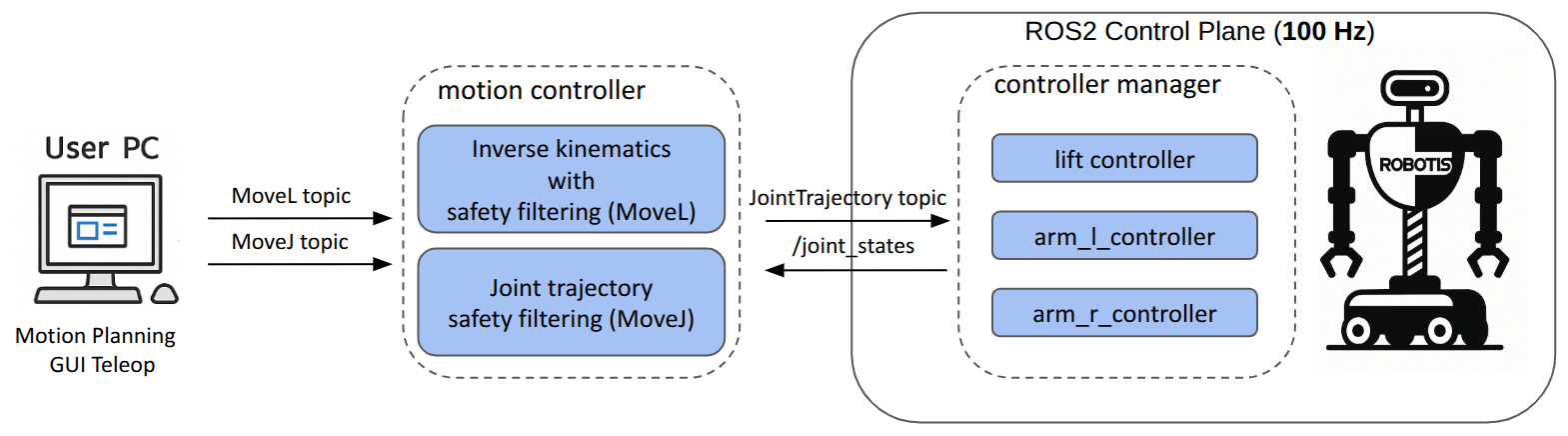
Its QP(Quadratic Programming)-based controller is especially useful because it does not only track the command, but also tries to keep the motion safe at the same time by considering limits and constraints such as joint range, joint velocity, and self-collision avoidance. In practice, you use it when you want to command the robot by target poses or joint commands while still relying on the controller to generate safe motion. 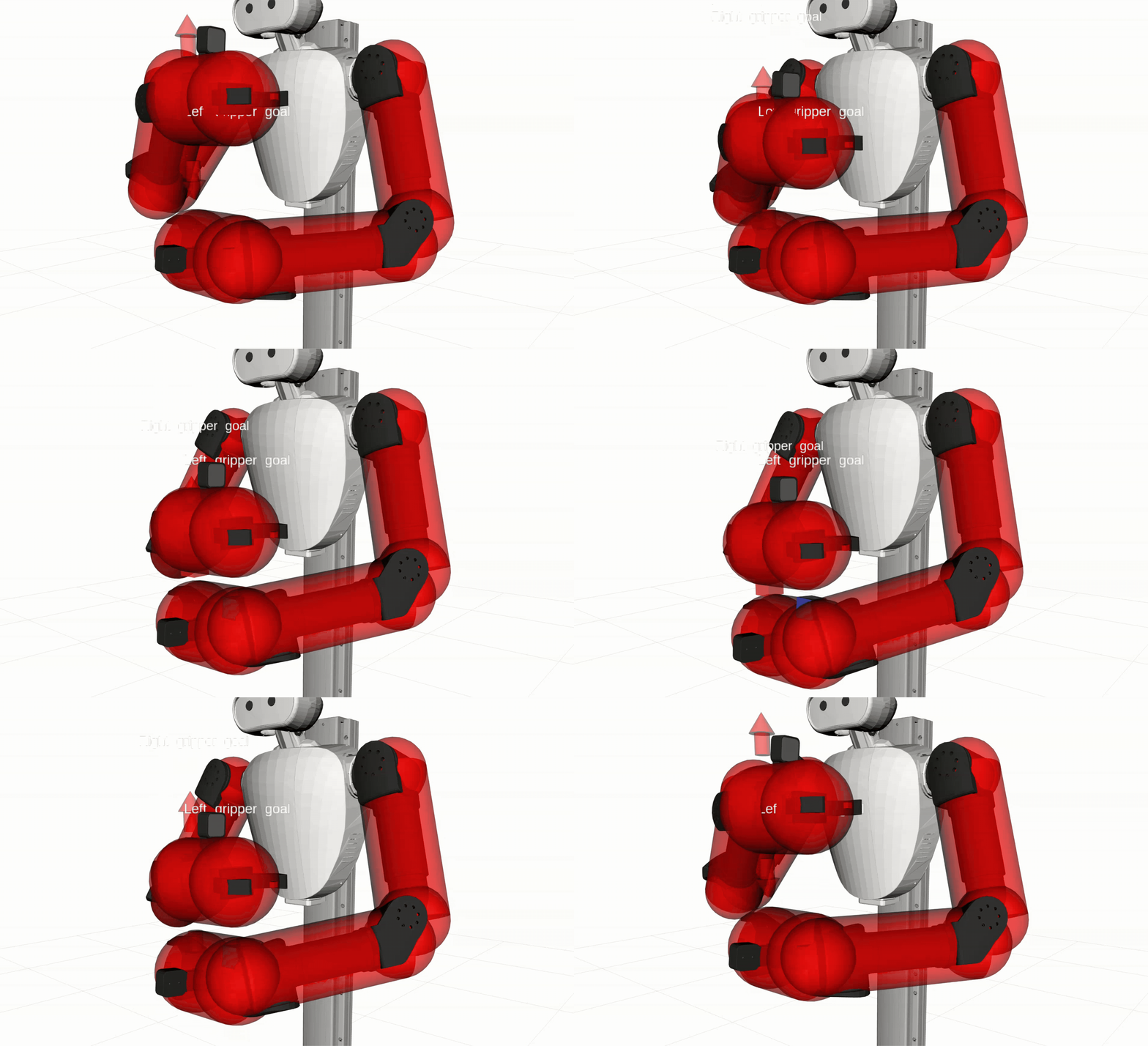
DANGER
⚠️ The controller only provides self-collision avoidance, and it is not guaranteed in all situations. Always operate the robot carefully and avoid fast or sudden movements.
Supported Controllers
controller_type:=movel(Default): Generates interpolated arm motion from the current hand pose to the requested goal pose.controller_type:=movej: Receives raw joint trajectories and republishes safer filtered trajectories for the robot.controller_type:=bimanual_movel: Runs aMoveLcontroller that can capture a rigid two-hand grasp and move the captured object with both arms together.controller_type:=bimanual_movej: Runs aMoveJcontroller that can preserve the captured relative pose between the two grippers while filtering raw joint trajectory commands.
Understanding MoveL and MoveJ
MoveL and MoveJ are not just "send one target and hope the robot gets there." They are motion commands that tell the controller to generate an interpolated motion from the robot's current state to the requested goal over a given time.
MoveLmeans "move in a Cartesian line." You command a target hand pose and an interpolation time, and the controller generates a smooth motion that keeps the end-effector on a straight (linear) path from the current pose to the goal.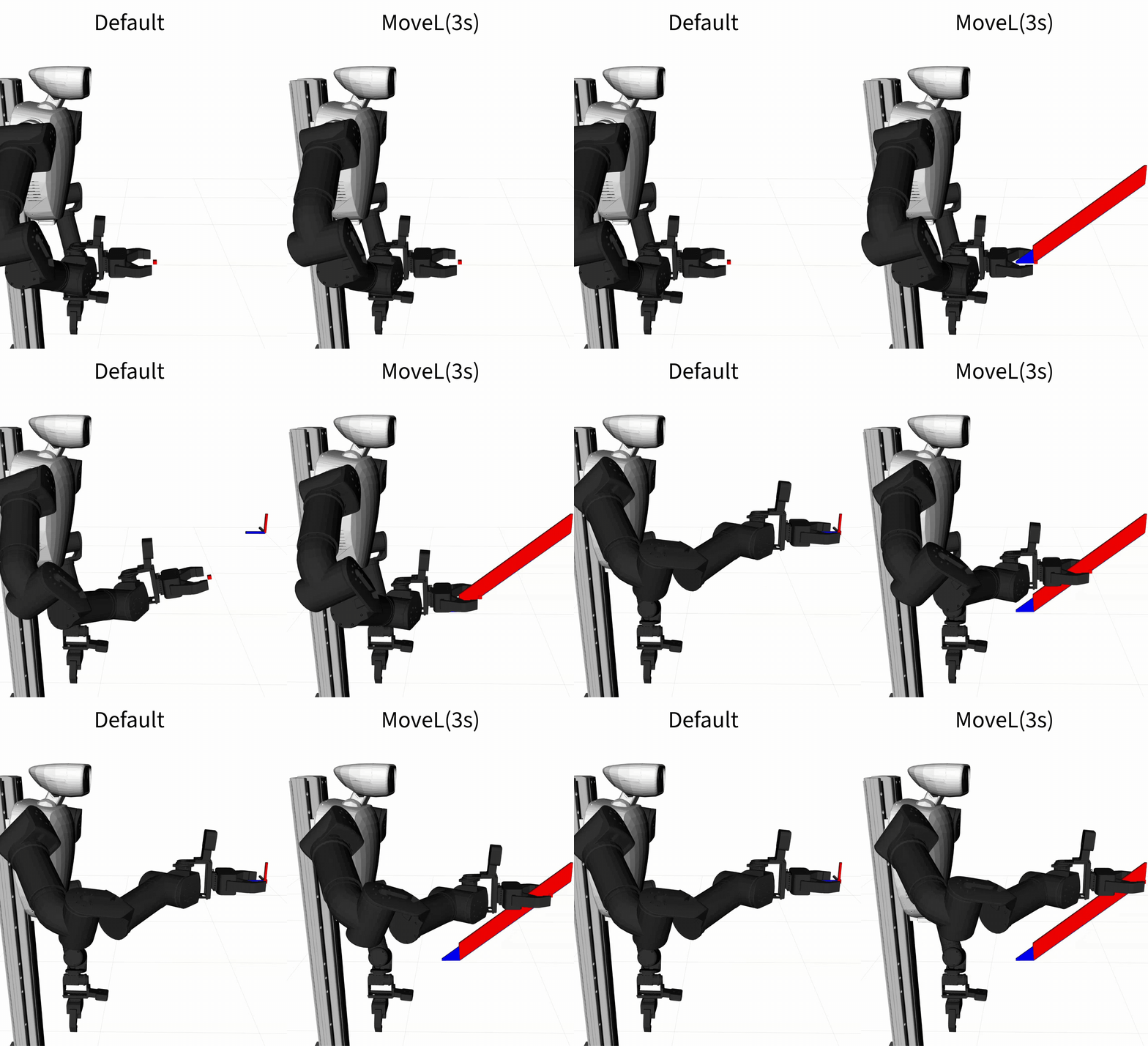
MoveJmeans "move in joint space." You command target joint values and an interpolation time, and the controller generates a smooth motion from the current joint configuration toward those values. Because the interpolation happens in joint space, the end-effector path is generally not a straight line and may appear curved.
This is different from a simple pose or joint command that only describes the desired target state. MoveL and MoveJ are higher-level motion commands because they also imply a transition from the current state to the goal, including how long that transition should take.
Understanding Bimanual Controllers
Bimanual controllers use the same MoveL and MoveJ command styles, but add a two-hand grasp mode for coordinated object motion. They are useful when the robot holds the same object with both grippers and the two hands should keep a fixed relative pose while the object moves.
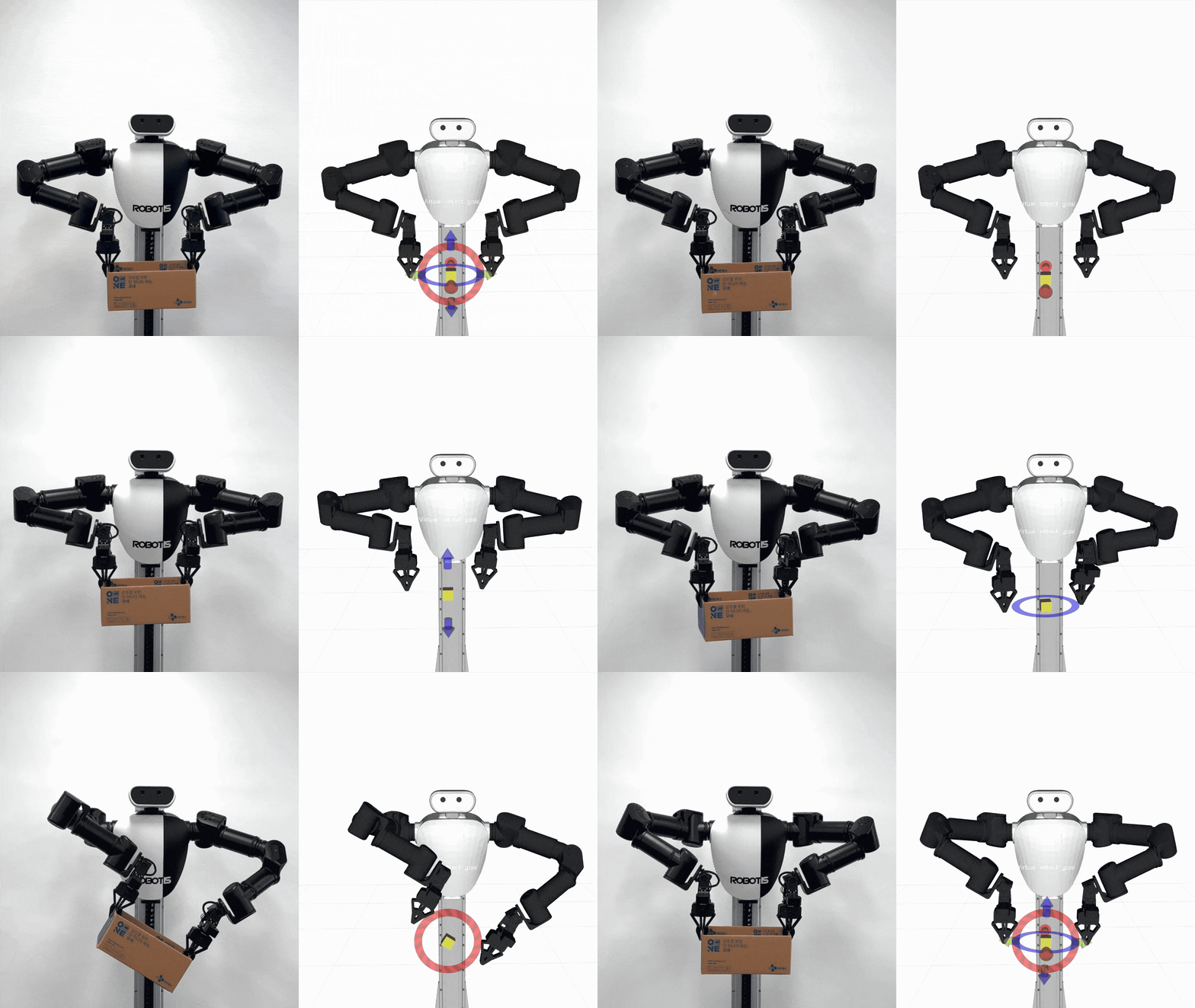
When grasp capture is enabled, the controller records the current transform between the configured right and left constraint links, such as the two gripper links. It then adds a 6D rigid grasp constraint to the QP solve, so the controller tracks the requested motion while also trying to preserve that captured relationship between the hands.
In bimanual_movel, you can first command the right and left hands independently with normal MoveL goals. After capture, you command the virtual object pose, and the controller derives the right and left hand goals from the captured grasp. In bimanual_movej, the controller still receives raw right and left joint trajectories, and it can enable the same rigid grasp constraint manually or automatically after both grippers are commanded closed.
Prerequisites
- Complete the hardware and software steps in the Setup Guide.
- In the default ai_worker Docker container environment, clone
cyclo_controlinto~/ros2_ws/src, then follow the installation steps in the README. - Ensure the robot is on level ground with enough clearance to move both arms safely.
- Make sure the emergency stop button is always within reach during operation.
- Connect to the robot PC and make sure the battery is charged.
Bring Up the Robot
Start the AI Worker follower bringup first. Run this on the robot PC:
cd ~/ai_worker
./docker/container.sh enter
ros2 launch ffw_bringup ffw_sg2_follower_ai.launch.py
Keep that terminal running. Open a new terminal for the motion controller commands below.
Launch MoveL Controller
Open two new terminals and run the same environment setup in both:
cd ~/ai_worker
./docker/container.sh enter
source /opt/ros/jazzy/setup.bash
source ~/ros2_ws/install/setup.bash- In the first terminal, launch the default
movelcontroller:bashros2 launch cyclo_motion_controller_ros ai_worker_controller.launch.py controller_type:=movel - For marker-based control in RViz, relaunch it with
start_interactive_marker:=true:bashros2 launch cyclo_motion_controller_ros ai_worker_controller.launch.py controller_type:=movel start_interactive_marker:=true - For handover-style motions where the two grippers may intentionally come into contact, relaunch it with
disable_gripper_collisions:=true:bashros2 launch cyclo_motion_controller_ros ai_worker_controller.launch.py controller_type:=movel start_interactive_marker:=true disable_gripper_collisions:=true - If you use marker-based control, start RViz if it is not already running:bash
rviz2 - In RViz, set the fixed frame to
base_linkand add these displays:RobotModelInteractiveMarkers
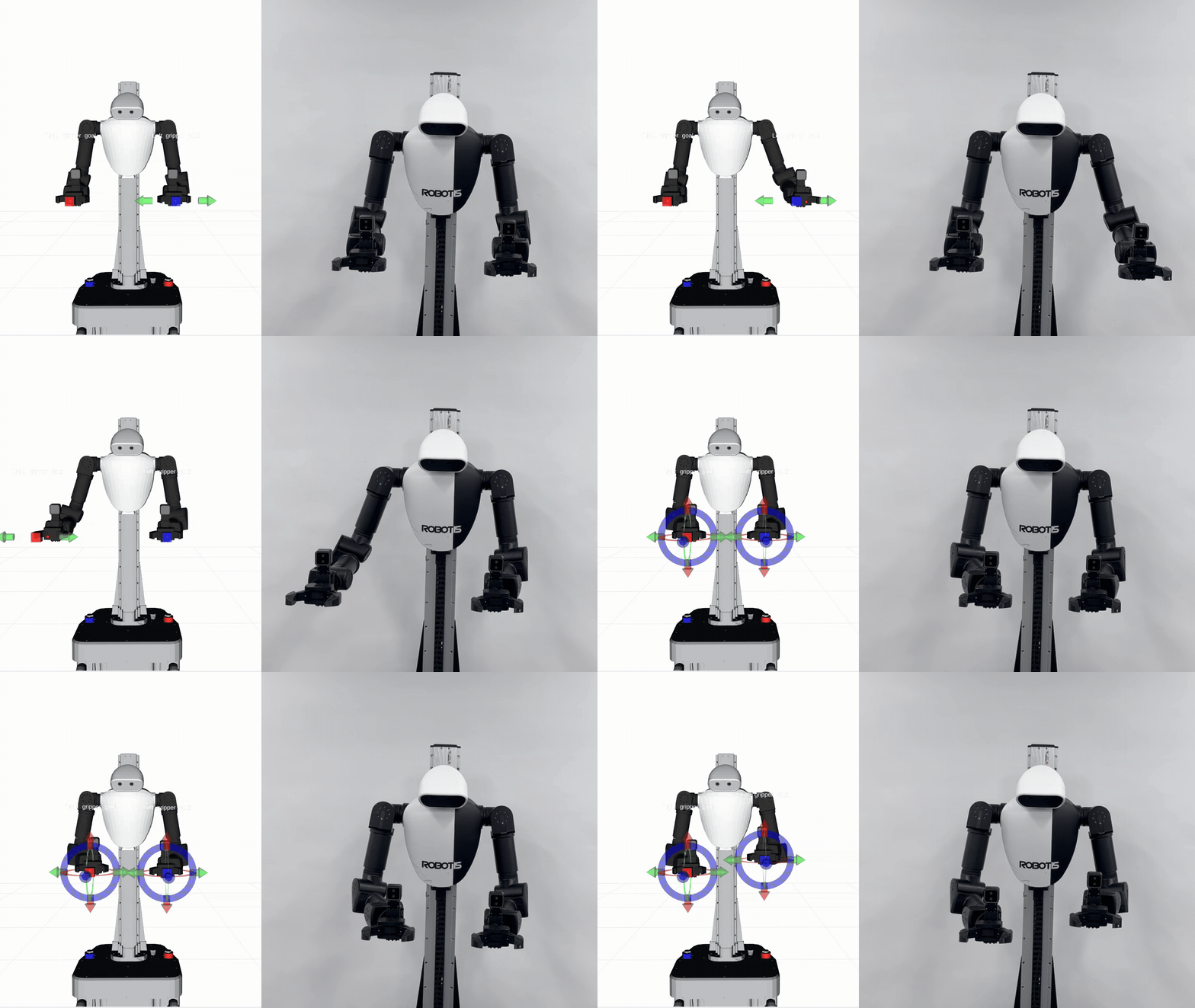
When start_interactive_marker:=true, the launch file starts two interactive markers:
right_goal_marker, which publishesMoveLcommands to/r_goal_moveleft_goal_marker, which publishesMoveLcommands to/l_goal_move
You can use the movel controller in two ways:
- Move the interactive markers in RViz to send new right and left Cartesian goals.
- Publish
MoveLcommands directly to/r_goal_moveand/l_goal_move.
TIP
The default movel controller plus interactive marker is usually the easiest way to test the motion controller because the interactive markers send MoveL commands directly and the controller handles inverse kinematics, constraint handling, and trajectory publishing.
ros2 topic pub --once /r_goal_move robotis_interfaces/msg/MoveL "{
  pose: {
    header: {frame_id: 'base_link'},
    pose: {
      position: {x: 0.35, y: -0.20, z: 0.85},
      orientation: {x: 0.0, y: 0.0, z: 0.0, w: 1.0}
    }
  },
  time_from_start: {sec: 2, nanosec: 0}
}"ros2 topic pub --once /l_goal_move robotis_interfaces/msg/MoveL "{
pose: {
header: {frame_id: 'base_link'},
pose: {
position: {x: 0.35, y: 0.20, z: 0.85},
orientation: {x: 0.0, y: 0.0, z: 0.0, w: 1.0}
}
},
time_from_start: {sec: 2, nanosec: 0}
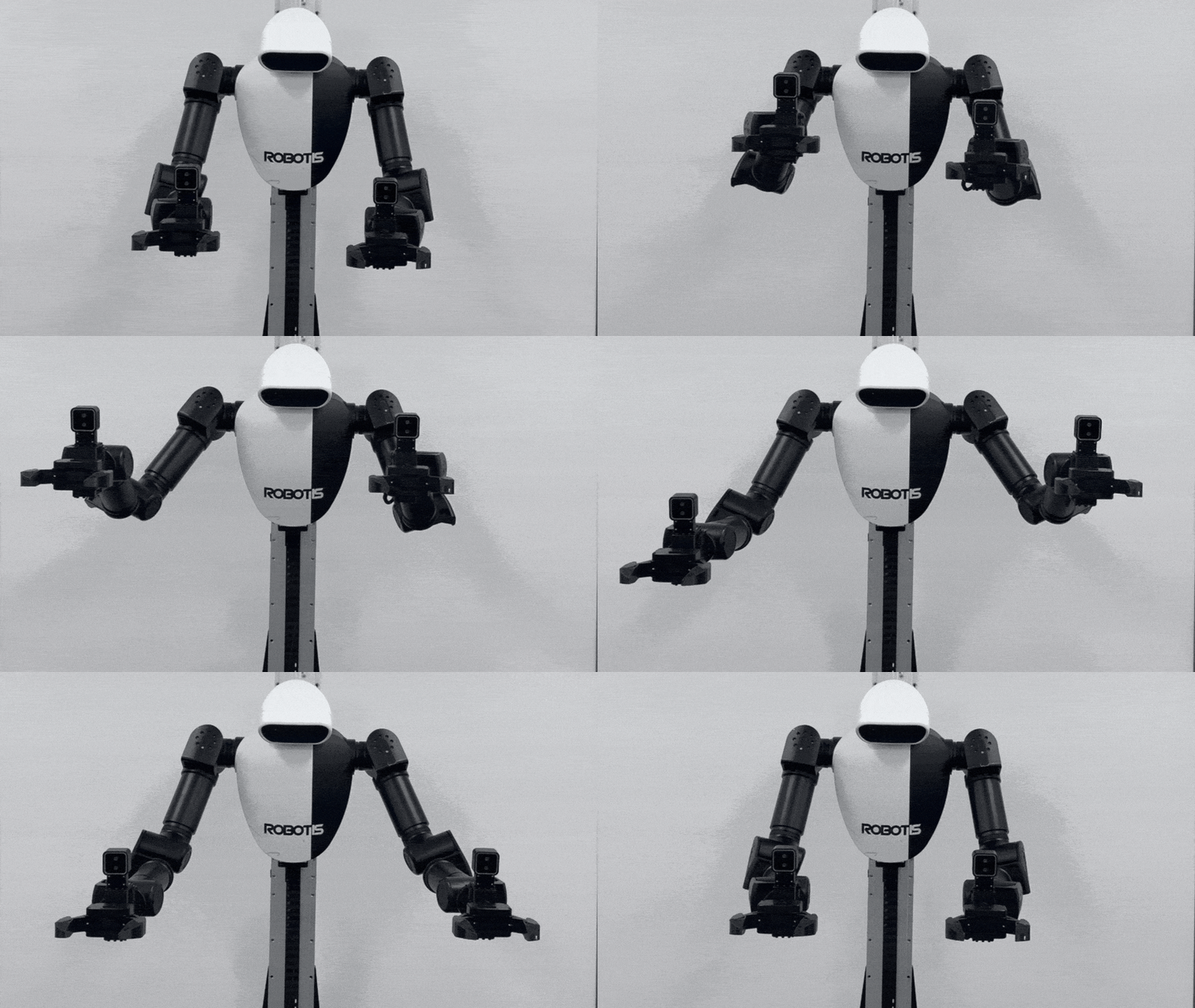
}"movel uses the time_from_start field as the interpolation duration for the Cartesian motion.
Launch MoveJ Controller
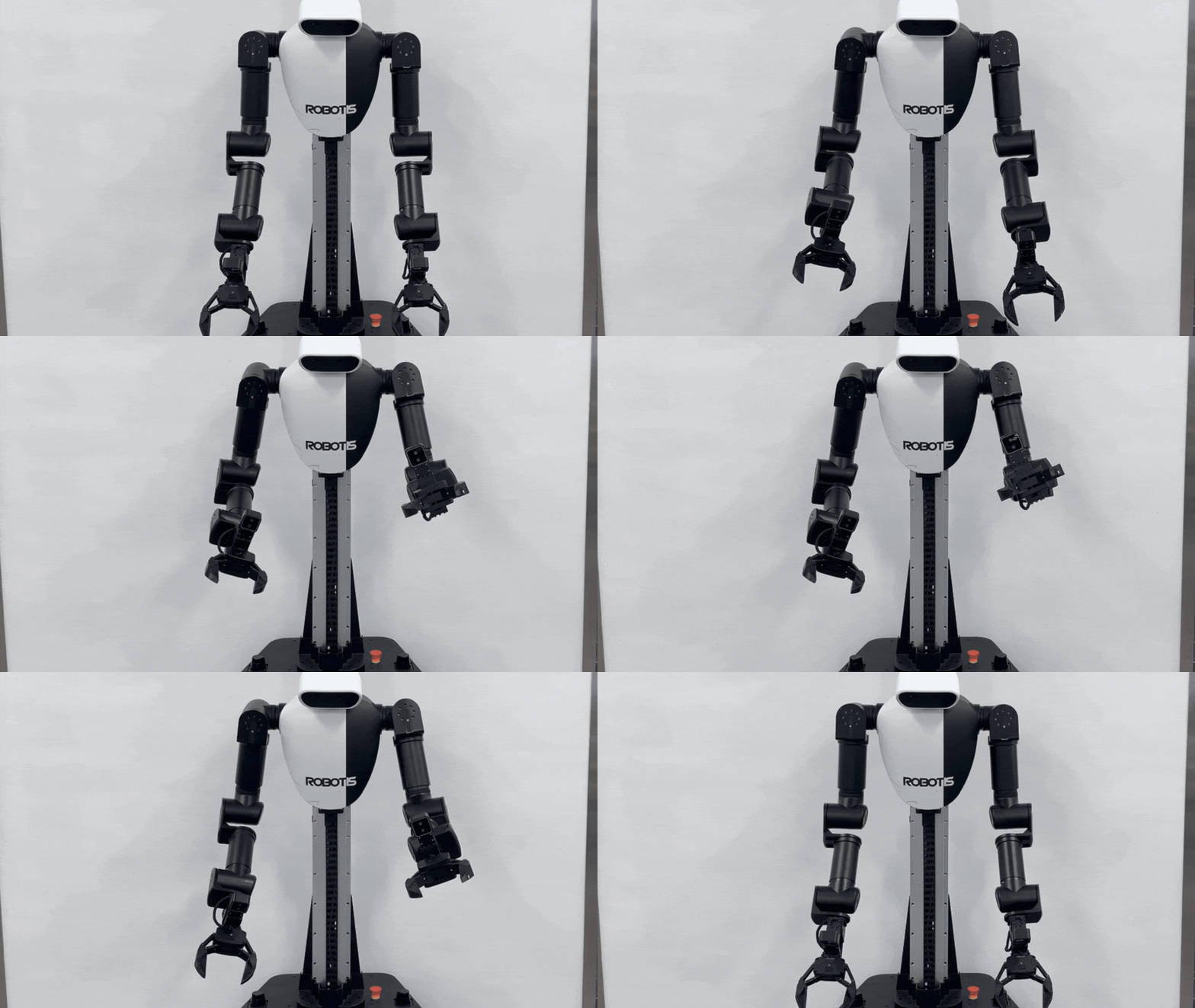
This controller is used to apply a safety filter to raw joint trajectory commands published for the follower arms.
ros2 launch cyclo_motion_controller_ros ai_worker_controller.launch.py controller_type:=movejFor handover-style motions where the two grippers may intentionally come into contact, relaunch it with disable_gripper_collisions:=true:
ros2 launch cyclo_motion_controller_ros ai_worker_controller.launch.py controller_type:=movej disable_gripper_collisions:=trueIt subscribes to:
/leader/joint_trajectory_command_broadcaster_right/raw_joint_trajectory/leader/joint_trajectory_command_broadcaster_left/raw_joint_trajectory
and republishes filtered outputs to:
/leader/joint_trajectory_command_broadcaster_right/joint_trajectory/leader/joint_trajectory_command_broadcaster_left/joint_trajectory
Example commands:
ros2 topic pub --once /leader/joint_trajectory_command_broadcaster_right/raw_joint_trajectory trajectory_msgs/msg/JointTrajectory "{
  joint_names: ['arm_r_joint1', 'arm_r_joint2', 'arm_r_joint3', 'arm_r_joint4', 'arm_r_joint5', 'arm_r_joint6', 'arm_r_joint7', 'gripper_r_joint1'],
  points: [
    {
      positions: [0.3, -0.2, 0.1, 0.0, 0.2, -0.1, 0.0, 0.02],
      time_from_start: {sec: 3, nanosec: 0}
    }
  ]
}"ros2 topic pub --once /leader/joint_trajectory_command_broadcaster_left/raw_joint_trajectory trajectory_msgs/msg/JointTrajectory "{
joint_names: ['arm_l_joint1', 'arm_l_joint2', 'arm_l_joint3', 'arm_l_joint4', 'arm_l_joint5', 'arm_l_joint6', 'arm_l_joint7', 'gripper_l_joint1'],
points: [
{
positions: [-0.3, 0.2, -0.1, 0.0, -0.2, 0.1, 0.0, 0.02],
time_from_start: {sec: 3, nanosec: 0}
}
]
}"TIP
When using a leader device with movej, the leader must publish its arm commands to the raw trajectory topics above.
Update the robot_controller_spawner node in ffw_lg2_leader_ai.launch.py by adding controller ROS remap arguments before the controller names:
robot_controller_spawner = Node(
    package='controller_manager',
    executable='spawner',
    arguments=[
        '--controller-ros-args',
        '-r /leader/joint_trajectory_command_broadcaster_left/joint_trajectory:='
        '/leader/joint_trajectory_command_broadcaster_left/raw_joint_trajectory',
        '--controller-ros-args',
        '-r /leader/joint_trajectory_command_broadcaster_right/joint_trajectory:='
        '/leader/joint_trajectory_command_broadcaster_right/raw_joint_trajectory',
        'joint_trajectory_command_broadcaster',
        'spring_actuator_controller_left',
        'spring_actuator_controller_right',
        'joystick_controller',
        'joint_state_broadcaster',
    ],
    parameters=[robot_description],
)
Launch Bimanual MoveL Controller
Use bimanual_movel when both arms should keep a captured relative pose while moving an object. Before grasp capture is enabled, the right and left arms still accept normal MoveL commands on /r_goal_move and /l_goal_move. After grasp capture is enabled, the controller treats the current two-gripper relationship as a rigid grasp and follows the virtual object command on /virtual_object_goal_move.
ros2 launch cyclo_motion_controller_ros ai_worker_controller.launch.py controller_type:=bimanual_movelFor RViz marker-based control, launch it with interactive markers:
ros2 launch cyclo_motion_controller_ros ai_worker_controller.launch.py controller_type:=bimanual_movel start_interactive_marker:=trueWhen start_interactive_marker:=true, the bimanual MoveL launch starts:
right_goal_marker, which publishes right-armMoveLcommands to/r_goal_movewhile grasp capture is inactiveleft_goal_marker, which publishes left-armMoveLcommands to/l_goal_movewhile grasp capture is inactivevirtual_object_marker, which publishes object-levelMoveLcommands to/virtual_object_goal_movewhile grasp capture is active
The grasp mode is controlled by /capture_grasp:
ros2 topic pub --once /capture_grasp std_msgs/msg/Bool "{data: true}"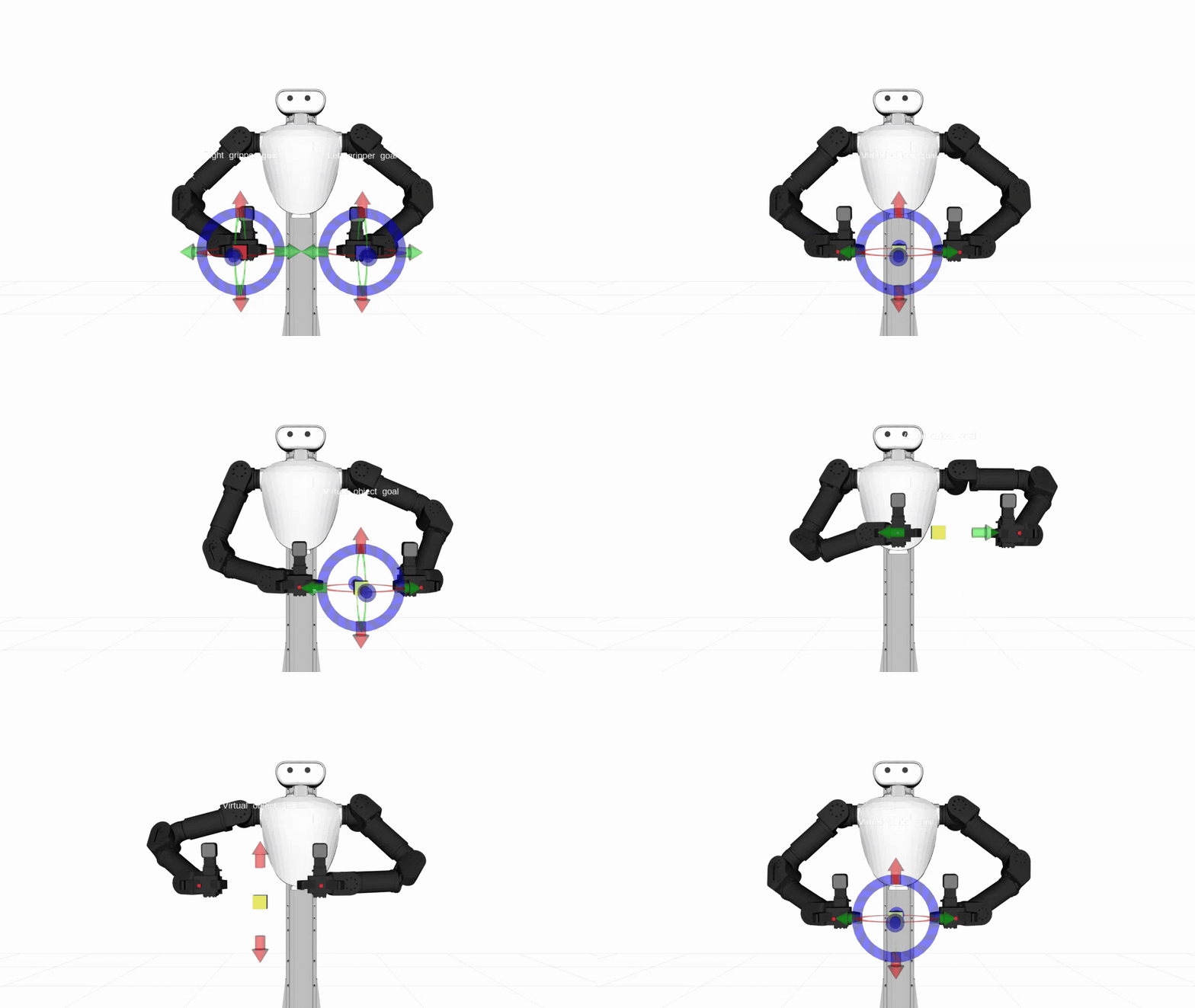
To release the rigid grasp constraint:
ros2 topic pub --once /capture_grasp std_msgs/msg/Bool "{data: false}"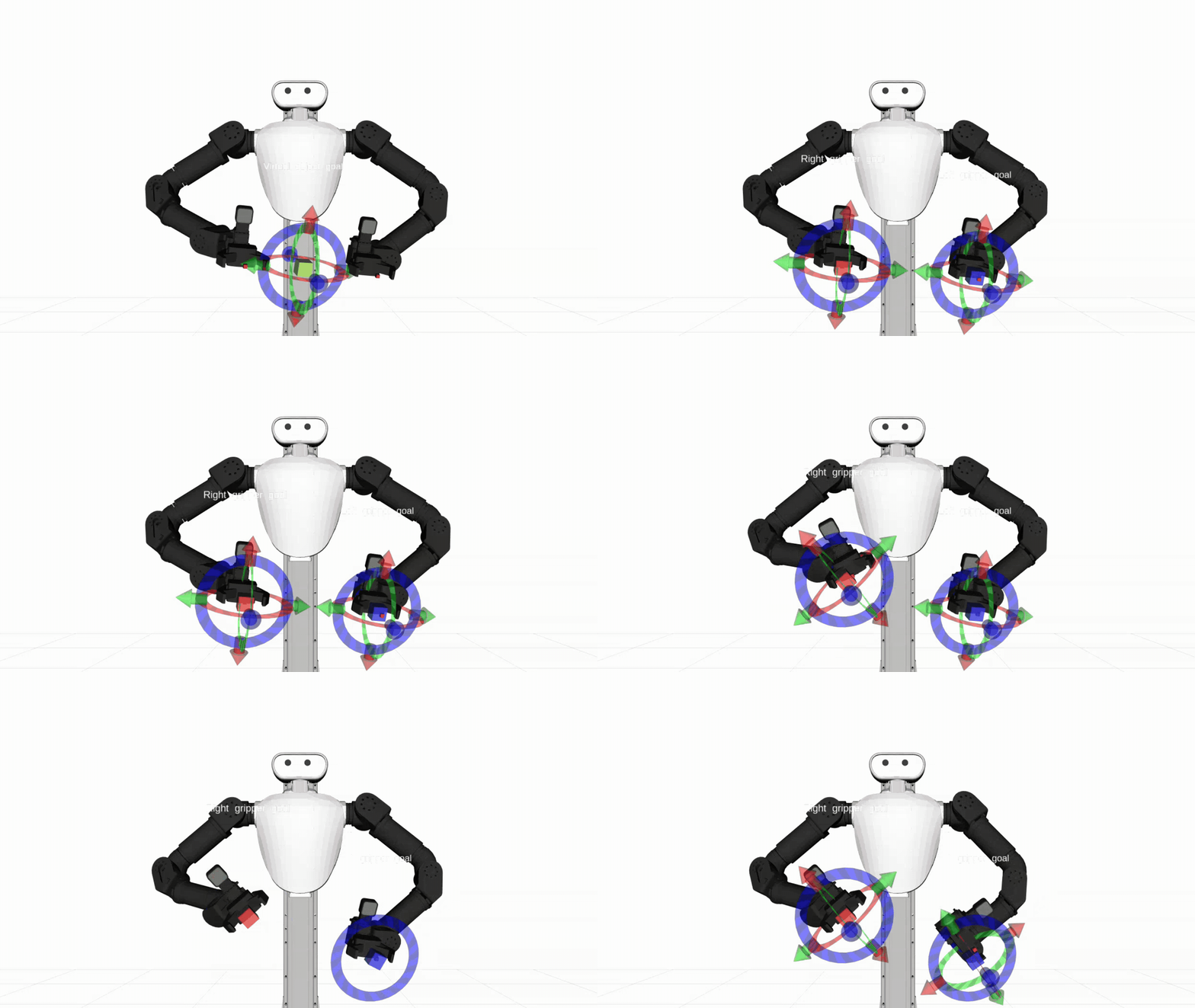
After capture, move the virtual object instead of commanding the two hands separately:
ros2 topic pub --once /virtual_object_goal_move robotis_interfaces/msg/MoveL "{
  pose: {
    header: {frame_id: 'base_link'},
    pose: {
      position: {x: 0.35, y: 0.0, z: 0.95},
      orientation: {x: 0.0, y: 0.0, z: 0.0, w: 1.0}
    }
  },
  time_from_start: {sec: 3, nanosec: 0}
}"
Launch Bimanual MoveJ Controller
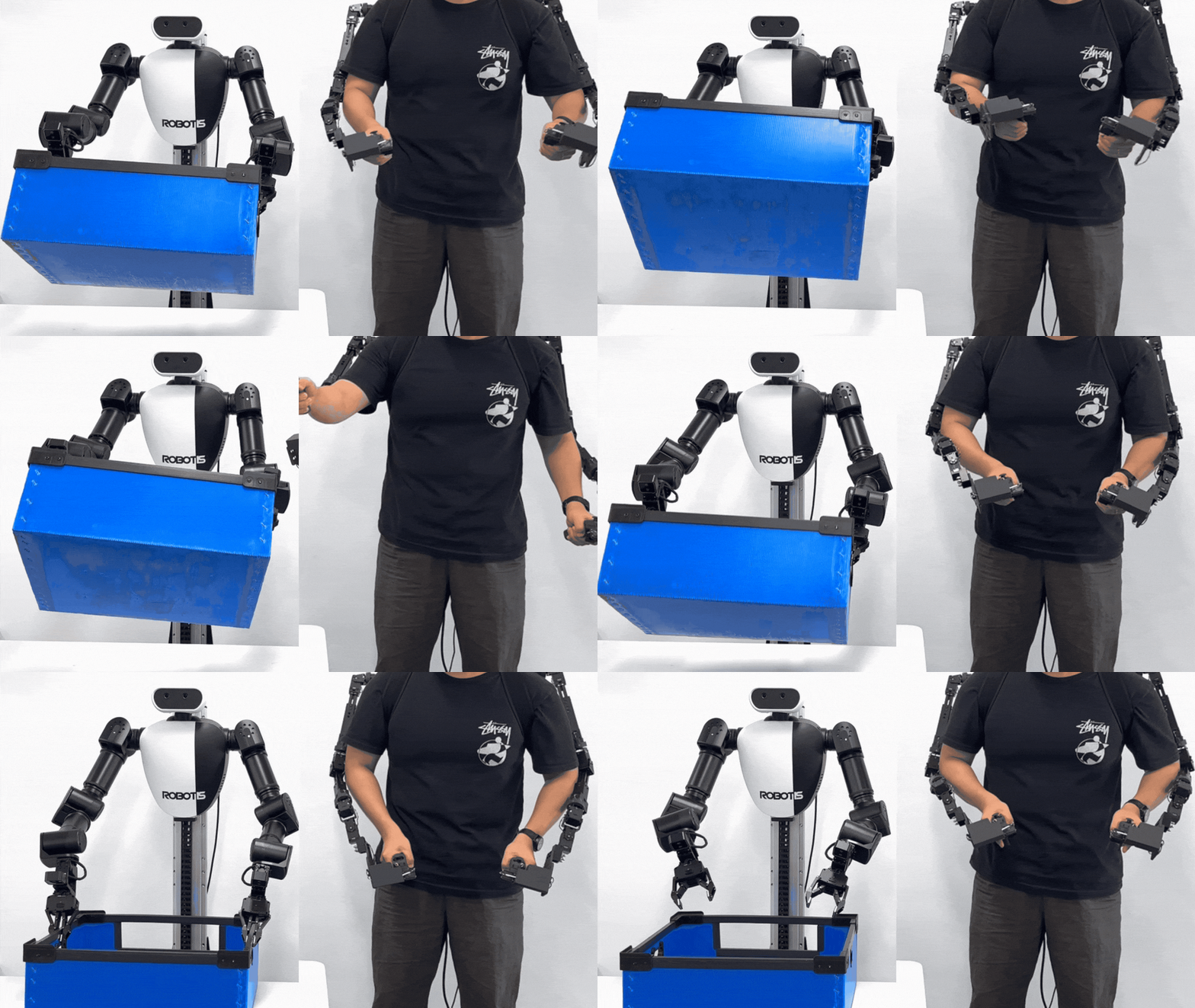
Use bimanual_movej when the input is still raw right and left joint trajectories, but the two hands may need to hold a rigid relative pose during a grasp. It uses the same raw input and filtered output topics as movej, and adds grasp capture logic.
ros2 launch cyclo_motion_controller_ros ai_worker_controller.launch.py controller_type:=bimanual_movejManual grasp capture uses the same /capture_grasp topic:
ros2 topic pub --once /capture_grasp std_msgs/msg/Bool "{data: true}"ros2 topic pub --once /capture_grasp std_msgs/msg/Bool "{data: false}"The controller can also infer grasp mode from gripper commands. When both configured gripper joints stay above gripper_grasp_threshold for gripper_grasp_hold_time, it enables the rigid grasp constraint. When one gripper stays below that threshold for the hold time, it disables or partially releases the constraint and slowly blends the arm back into follower control.
Example input commands are the same shape as normal movej
TIP
When using a leader device with bimanual_movej, the leader must publish its arm commands to the raw trajectory topics.
Update the robot_controller_spawner node in ffw_lg2_leader_ai.launch.py by adding controller ROS remap arguments before the controller names:
robot_controller_spawner = Node(
    package='controller_manager',
    executable='spawner',
    arguments=[
        '--controller-ros-args',
        '-r /leader/joint_trajectory_command_broadcaster_left/joint_trajectory:='
        '/leader/joint_trajectory_command_broadcaster_left/raw_joint_trajectory',
        '--controller-ros-args',
        '-r /leader/joint_trajectory_command_broadcaster_right/joint_trajectory:='
        '/leader/joint_trajectory_command_broadcaster_right/raw_joint_trajectory',
        'joint_trajectory_command_broadcaster',
        'spring_actuator_controller_left',
        'spring_actuator_controller_right',
        'joystick_controller',
        'joint_state_broadcaster',
    ],
    parameters=[robot_description],
)
Launch Arguments
Common launch arguments:
controller_type: Selectsmovel,movej,bimanual_movel,bimanual_movej,vr, orleader. Default:movel.config_file: Controller configuration yaml file. Default:cyclo_motion_controller_ros/config/ai_worker_config.yaml.follower_urdf_path: Follower robot URDF path.default_srdf_path,modified_srdf_path: SRDF paths selected bydisable_gripper_collisions.disable_gripper_collisions: Uses the modified SRDF that disables collision checking between the configured gripper collision links. Default:false.
Interactive marker arguments:
start_interactive_marker: Starts RViz interactive markers formovelandbimanual_movel. Default:false.base_frame: Frame used for interactive marker goals. Default:base_link.marker_scale: Interactive marker scale. Default:0.2.right_controlled_link,left_controlled_link: Controlled link names used to initialize the right and left markers. Defaults:end_effector_r_link,end_effector_l_link.right_movel_topic,left_movel_topic: Right and leftMoveLtopics used by normal and bimanualMoveL. Defaults:/r_goal_move,/l_goal_move.right_goal_pose_topic,left_goal_pose_topic: PoseStamped topics published by the right and left markers. Defaults:/r_goal_pose,/l_goal_pose.
Bimanual-only launch arguments:
virtual_object_movel_topic,virtual_object_pose_topic: Virtual-objectMoveLand PoseStamped marker topics forbimanual_movel. Defaults:/virtual_object_goal_move,/virtual_object_goal_pose.grasp_capture_topic: Bool topic used to enable or disable bimanual grasp capture. Default:/capture_grasp.
Other controller modes:
leader_urdf_path: Leader robot URDF path used bycontroller_type:=leader.reactivate_topic,arm,hand: Arguments used by thevrandleadermodes.
Key Topics and Services
Common Topics
/joint_states: Measured robot state required by all controller modes/leader/joint_trajectory_command_broadcaster_right/joint_trajectory: Right arm command output used by all four motion controller modes/leader/joint_trajectory_command_broadcaster_left/joint_trajectory: Left arm command output used by all four motion controller modes
MoveL Family
/r_goal_move: Right armMoveLcommand topic formovelandbimanual_movel/l_goal_move: Left armMoveLcommand topic formovelandbimanual_movel/r_gripper_pose,/l_gripper_pose: Published current gripper poses/leader/joystick_controller_right/joint_trajectory: Lift trajectory output when lift motion is enabled bylift_vel_bound
MoveJ Family
/leader/joint_trajectory_command_broadcaster_right/raw_joint_trajectory: Raw right-arm joint trajectory input formovejandbimanual_movej/leader/joint_trajectory_command_broadcaster_left/raw_joint_trajectory: Raw left-arm joint trajectory input formovejandbimanual_movej/leader/joint_trajectory_command_broadcaster_right/joint_trajectory: Filtered right-arm output trajectory, with gripper command preserved when present/leader/joint_trajectory_command_broadcaster_left/joint_trajectory: Filtered left-arm output trajectory, with gripper command preserved when present
Bimanual Additions
/capture_grasp: Bool topic that enables or disables the rigid grasp constraint/virtual_object_goal_move: Virtual-objectMoveLcommand used bybimanual_movelafter grasp capture/r_goal_pose,/l_goal_pose: PoseStamped topics published by the right and left markers/virtual_object_goal_pose: PoseStamped topic published by the virtual-object marker
Controller Parameters
The main parameters live in cyclo_motion_controller_ros/config/ai_worker_config.yaml. The file is divided by controller name, so you usually tune only the block that matches the controller mode you are running.
Shared Parameters
control_frequency,time_step: Main control loop speed.trajectory_time: Time field used when publishing output joint trajectories.weight_damping: Regularization term that discourages unnecessarily large joint velocities.collision_buffer,collision_safe_distance: Safety margins used for collision avoidance.slack_penalty: Cost applied when the solver must relax constraints. Larger values enforce constraints more strictly.cbf_alpha: Responsiveness of the barrier constraint. Larger values make the constraint act more like a full brake near a cliff, affecting the control input later and more abruptly as the motion gets very close to the constraint boundary.joint_state_timeout: Maximum age of/joint_statesbefore the controller holds commands.joint_states_topic: Source of measured robot state.
MoveL Family Parameters
- Applies to:
ai_worker_movel_controller,ai_worker_bimanual_movel_controller kp_position,kp_orientation: Cartesian tracking gains for end-effector or virtual-object tracking.weight_position,weight_orientation: Relative importance of position and orientation tracking in the QP solve.right_movel_topic,left_movel_topic: Right and leftMoveLcommand input topics.lift_topic,lift_vel_bound: Lift command path settings. Whenlift_vel_boundis0, the controller does not consider lift joint motion.r_gripper_pose_topic,l_gripper_pose_topic: Published current gripper pose topics.r_gripper_name,l_gripper_name: Link names used to compute the gripper pose and, in bimanual mode, the grasp constraint.
Only ai_worker_movel_controller:
right_gripper_joint,left_gripper_joint: Gripper joint names preserved in published trajectories.controller_error_topic: Published controller error topic.
Only ai_worker_bimanual_movel_controller:
virtual_object_movel_topic: Object-levelMoveLcommand topic used after grasp capture.grasp_capture_topic: Bool topic used to capture or release the rigid two-hand grasp.
MoveJ Family Parameters
- Applies to:
ai_worker_movej_controller,ai_worker_bimanual_movej_controller kp_joint: Joint-space tracking gain for the target command.weight_tracking: Relative importance of joint tracking in the QP solve.right_traj_topic,left_traj_topic: Raw right and left joint trajectory input topics.right_traj_filtered_topic,left_traj_filtered_topic: Filtered right and left output trajectory topics.right_gripper_joint,left_gripper_joint: Gripper joint names read from raw commands and preserved in filtered output.
Only ai_worker_movej_controller:
command_timeout: Maximum age of raw trajectory commands before the controller treats command input as stale.
Only ai_worker_bimanual_movej_controller:
grasp_capture_topic: Bool topic used to manually capture or release the rigid two-hand grasp.r_gripper_name,l_gripper_name: Link names used as the right and left constraint links for grasp capture.gripper_grasp_threshold: Gripper position threshold used for automatic grasp detection.gripper_grasp_hold_time: Time both grippers must remain above the threshold before enabling grasp mode, or below it before releasing grasp mode.
Troubleshooting
- If the markers do not appear in RViz after setting
start_interactive_marker:=true, check that theInteractiveMarkersdisplay is added and that thebase_frameis set correctly.(default set tobase_link) - If the
movelcontroller does not move, check the terminal log to see whether/joint_statesis updating and whetherMoveLcommands are arriving on/r_goal_moveand/l_goal_move. - If
movejdoes not respond, confirm the raw trajectory topics are receiving commands and that each command includes correct joint names. - If any controller holds position unexpectedly, check whether
/joint_stateshas stopped. The bimanual controllers stop updating commands afterjoint_state_timeoutuntil fresh feedback is received.
Safety and Usage Tips
DANGER
⚠️ The controller only provides self-collision avoidance, and it is not guaranteed in all situations. Operate the robot carefully and avoid fast or sudden movements.
- Keep people, cables, and nearby objects clear before sending commands.
- Start with small motions first to confirm the model, frames, and topics are configured correctly.
- Always stay within reach of the emergency stop during operation.
- Stop the controller immediately with
Ctrl+Cif it is safe to do so and the robot behaves unexpectedly.