
Getting Started with ROBOTIS Lab
Overview
ROBOTIS Lab is a research-oriented repository based on Isaac Lab, designed to enable reinforcement learning and imitation learning experiments using Robotis robots in simulation. This project provides simulation environments, configuration tools, and task definitions tailored for Robotis hardware, leveraging NVIDIA Isaac Sim’s powerful GPU-accelerated physics engine and Isaac Lab’s modular RL pipeline.
INFO
This repository currently depends on IsaacLab v2.2.0 or higher.
Installation (Docker)
Docker installation provides a consistent environment with all dependencies pre-installed.
Prerequisites:
- Docker and Docker Compose installed
- NVIDIA Container Toolkit installed
- NVIDIA GPU with appropriate drivers
Steps:
Clone robotis_lab repository with submodules:
bashgit clone --recurse-submodules https://github.com/ROBOTIS-GIT/robotis_lab.git cd robotis_labIf you already cloned without submodules, initialize them:
bashgit submodule update --init --recursiveBuild and start the Docker container:
bash./docker/container.sh startEnter the container:
bash./docker/container.sh enter
Docker Commands:
./docker/container.sh start- Build and start the container./docker/container.sh enter- Enter the running container./docker/container.sh stop- Stop the container./docker/container.sh logs- View container logs./docker/container.sh clean- Remove container and image
What's included in the Docker image:
- Isaac Sim 5.1.0
- Isaac Lab v2.3.0 (from third_party submodule)
- CycloneDDS 0.10.2 (from third_party submodule)
- robotis_dds_python (from third_party submodule)
- LeRobot 0.3.3 (in separate virtual environment at
~/lerobot_env) - All required dependencies and configurations
Running Examples
Reinforcement Learning
FFW-BG2 Reach Task
Sim2Sim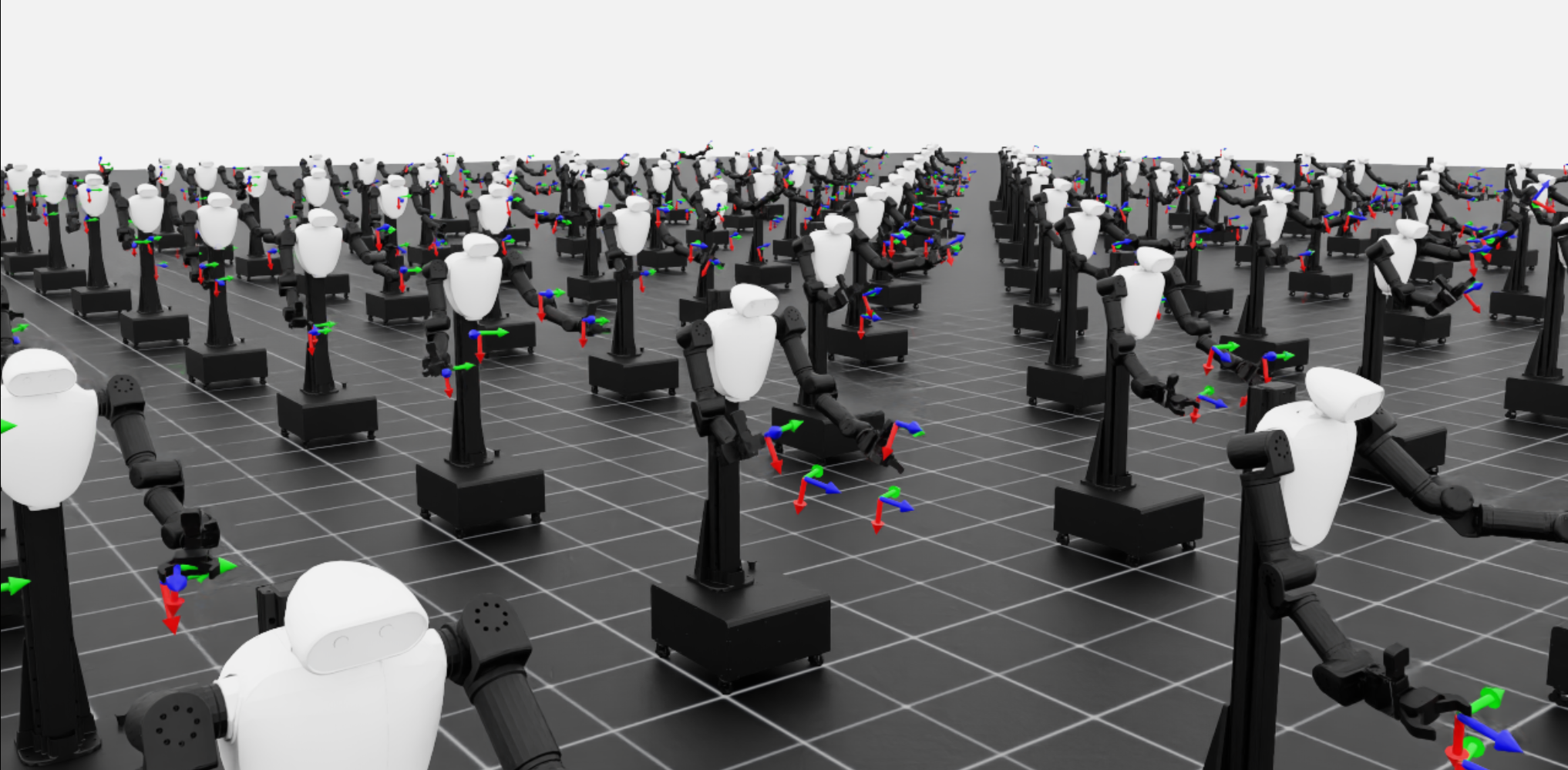
# Train
python scripts/reinforcement_learning/rsl_rl/train.py --task RobotisLab-Reach-FFW-BG2-v0 --num_envs=512 --headless

# Play
python scripts/reinforcement_learning/rsl_rl/play.py --task RobotisLab-Reach-FFW-BG2-v0 --num_envs=16
Imitation Learning
ROBOTIS Lab supports imitation learning pipelines for ROBOTIS robots. Using the AI Worker as an example, you can collect demonstration data, process it, convert it into the Lerobot dataset format, and run inference or training using physical_ai_tools.
FFW SG2 Pick and Place Task
Sim2Sim & Sim2Real
- Teleoperation and Demo Recording Record demonstrations using teleoperation while capturing camera observations and robot states.
 python scripts/sim2real/imitation_learning/recorder/record_demos.py \
 --task=RobotisLab-Real-Pick-Place-FFW-SG2-v0 \
 --robot_type FFW_SG2 --dataset_file ./datasets/ffw_sg2_raw.hdf5 \
 --num_demos 4 \
--enable_cameras- Dataset Processing and Generation You can further process recorded demos, annotate them, and generate augmented datasets for better coverage.
# Convert actions from joint space to end-effector pose
 python scripts/sim2real/imitation_learning/mimic/action_data_converter.py \
 --robot_type FFW_SG2 \
 --input_file ./datasets/ffw_sg2_raw.hdf5 \
 --output_file ./datasets/ffw_sg2_ik.hdf5 \
 --action_type ik

# Annotate dataset
 python scripts/sim2real/imitation_learning/mimic/annotate_demos.py \
 --task RobotisLab-Real-Mimic-Pick-Place-FFW-SG2-v0 \
 --auto \
 --input_file ./datasets/ffw_sg2_ik.hdf5 \
 --output_file ./datasets/ffw_sg2_annotate.hdf5 \
 --enable_cameras \
 --headless

# Generate augmented dataset
 python scripts/sim2real/imitation_learning/mimic/generate_dataset.py \
 --device cuda \
 --num_envs 10 \
 --task RobotisLab-Real-Mimic-Pick-Place-FFW-SG2-v0 \
 --generation_num_trials 500 \
 --input_file ./datasets/ffw_sg2_annotate.hdf5 \
 --output_file ./datasets/ffw_sg2_generate.hdf5 \
 --enable_cameras \
 --headless

# Convert actions back to joint space
 python scripts/sim2real/imitation_learning/mimic/action_data_converter.py \
 --robot_type FFW_SG2 \
 --input_file ./datasets/ffw_sg2_generate.hdf5 \
 --output_file ./datasets/ffw_sg2_final.hdf5 \
--action_type joint- Convert IsaacLab Dataset to Lerobot Format The processed datasets can be converted to the Lerobot dataset format, which is compatible with physical_ai_tools for training and inference.
 lerobot-python scripts/sim2real/imitation_learning/data_converter/isaaclab2lerobot.py \
 --task=RobotisLab-Real-Pick-Place-FFW-SG2-v0 \
 --robot_type FFW_SG2 \
--dataset_file ./datasets/ffw_sg2_final.hdf5- Training and Inference with physical_ai_tools
- Inference in Simulation If you want to verify inference in the simulator, run the inference using physical_ai_tools, and then launch the simulator using the command below.
 python scripts/sim2real/imitation_learning/inference/inference_demos.py \
 --task RobotisLab-Real-Pick-Place-FFW-SG2-v0 \
 --robot_type FFW_SG2 \
 --enable_cameras