
Setup Guide for Robotis Hand
This guide will walk you through the process of setting up your ROBOTIS Hand hardware and software environment.
Hardware Setup
Hardware Requirements
| Required Hardware | Qty | Description | Link |
|---|---|---|---|
| HX5-D20 | 1 | ROBOTIS Hand | Link |
| U2D2 | 1 | U2D2 is a small size USB communication converter that enables to control and to operate the DYNAMIXEL with the PC | Link |
| SMPS | 1 | Power supply and battery charging device (RECOMMENDED 24V) | |
| U2D2 Power Hub | 1 | The U2D2 Power Hub Board combines with the U2D2 to supply a variety of external power sources to DYNAMIXELs | Link |
| 4-pin Robot Cable | 2 | The RS-485 communication 4p cable set for DYNAMIXEL | Link |
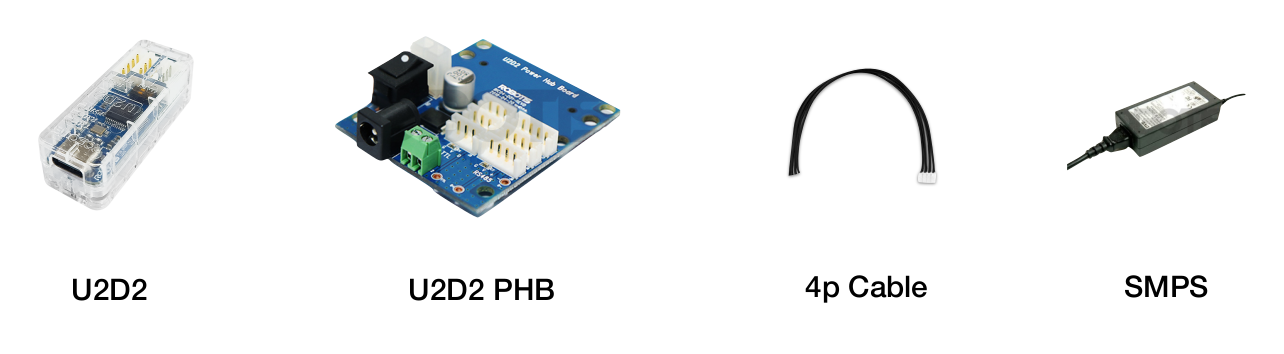
* Additional items shown sold separately.
Hardware Connection
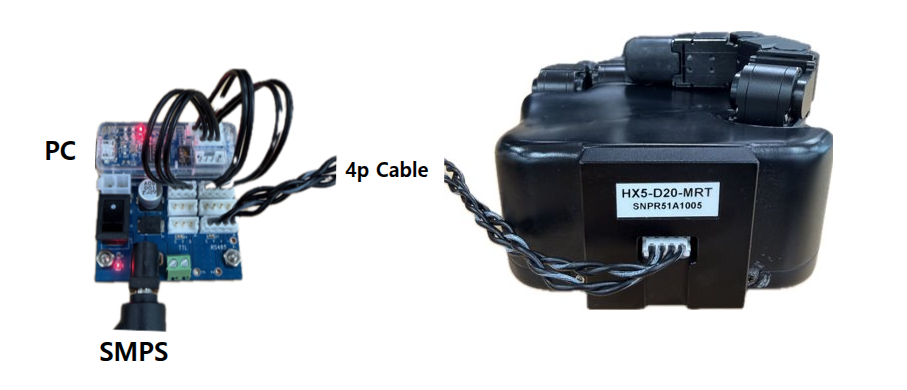
- Connect the SMPS and the 4-pin robot cable to the U2D2 Power Hub
- Connect the 4-pin robot cable to the 4-pin port of the HX5-D20
Software Setup
Prerequisites
- Operating System: Any Linux distribution
- The container runs
Ubuntu 24.04 (ROS 2 Jazzy)
- The container runs
- Container Engine: Docker Engine
- Follow the official Docker installation guide
- Complete the post-installation steps
- Required steps:
- Install Docker Engine using the repository method
- Add your user to the docker group
- Enable Docker to start on boot
- Verify installation with
docker run hello-world
- Version Control: Git
Configuration
Docker Volume Management
The Docker container uses the following volume mappings for data persistence and hardware access:
yaml
volumes:
  # Hardware and System Access
  - /dev:/dev                                   # Hardware device access
  - /tmp/.X11-unix:/tmp/.X11-unix:rw            # X11 display
  - /tmp/.docker.xauth:/tmp/.docker.xauth:rw    # X11 authentication

  # Development and Data Storage
  - ./workspace:/workspace                      # Main workspace directory
  - ../:/root/ros2_ws/src/robotis_hand/         # ROBOTIS Hand source code
⚠️ Important: Data Persistence
- Container data is volatile and will be lost when the container is removed
- Always store important data in the mapped volumes:
- Use
/workspacefor development files - Save model outputs to the mapped output directory
- Keep source code changes in the mapped volumes
- Use
Container Management
Initial Setup
bash# Clone the repository cd ~/ # or your preferred directory git clone -b jazzy https://github.com/ROBOTIS-GIT/robotis_hand.git cd robotis_handContainer Operations
bash# Start container ./docker/container.sh start # Enter running container ./docker/container.sh enter # Stop container ./docker/container.sh stop
Docker Command Guide
The container.sh script provides easy container management:
Available Commands
help: Display help messagestart: Start containerenter: Enter running containerstop: Stop container
Usage Examples
bash
./container.sh help                 # Show help
./container.sh start                # Start container
./container.sh enter                # Enter container
./container.sh stop                 # Stop container